

On 26 August 2026, legacy ScriptTags on the Thank you and Order status pages stop working for non-Plus Shopify stores. If an app still injects analytics, affiliate tracking, buyer-facing content or order handoff logic into those pages through a ScriptTag, that function needs a supported replacement before cutover.
Shopify's route is not one universal replacement. Tracking usually moves to an app pixel or custom pixel. Buyer-visible page content moves to an app block or checkout UI extension. Business-critical order handoffs should move away from browser-page JavaScript and into a server-side app or webhook integration.
This is not the Shopify Scripts deadline. Ruby-based line-item, shipping and payment Scripts stopped executing on 30 June 2026. If discounts, delivery options or payment methods changed after that date, use Fourmeta's Shopify Scripts and Functions recovery guide instead. ScriptTags are a separate technology with a separate recovery path.
Need the exposure assessed before cutover? Send Fourmeta your store URL and the Apps section of Shopify's upgrade guide. We will identify the likely pixel, extension or integration route and the tests that should block release. Request a non-Plus checkout cutover assessment.
What changes on 26 August 2026?
Shopify's current non-Plus upgrade guide sets 26 August 2026 as the deadline for non-Plus stores to move their existing Thank you and Order status pages to the new versions.
Shopify's ScriptTag guidance adds the technical detail:
- Since 1 February 2025, apps have not been able to create new ScriptTags on the Thank you or Order status pages.
- ScriptTags created before that date could continue for existing non-Plus installations until 26 August 2026.
- After the deadline, those checkout-page ScriptTags no longer work.
- Stores that do not complete the non-Plus page upgrade are scheduled to be auto-upgraded, and unrecreated legacy customisations are lost.
The deadline is specific to legacy post-purchase checkout surfaces. It does not mean that every JavaScript file in a Shopify theme stops working. Shopify still documents the ScriptTag resource for vintage online-store themes, although theme app extensions are the preferred architecture for modern themes.
What is actually at risk?
Treat anything on the Thank you or Order status page that depends on an old app injection as suspect until it has been mapped and tested. Common examples include:
- GA4, Meta, TikTok, affiliate or other purchase-conversion tracking inserted by an older app;
- GTM containers or third-party SDKs that expect direct access to the page DOM;
- post-purchase surveys, referral prompts, review requests, download links or support banners;
- loyalty, membership or customer-service widgets;
- scripts that read order data and send it to another platform when the page loads;
- custom apps listed as incompatible in Shopify's personalised upgrade guide.
A visible page can still load normally while commercial measurement or a downstream process has disappeared. That is why the safest check starts with an inventory, not a visual spot-check.
The five-minute non-Plus diagnosis
1. Open Settings > Checkout. In Configurations, look for the notice to upgrade the Thank you and Order status pages.
2. Open Review customisations. Save the Apps, incompatible apps, tracking and additional scripts sections as your starting inventory.
3. Assign a business purpose to every item. Write tracking, buyer UI, attribution, fulfilment handoff, authentication or support - not just the app name.
4. Name an owner and evidence source. For example: paid media owns Meta purchase events; operations owns the warehouse handoff; CX owns download and support links.
5. Mark the item red if nobody can prove the supported replacement is connected and tested.
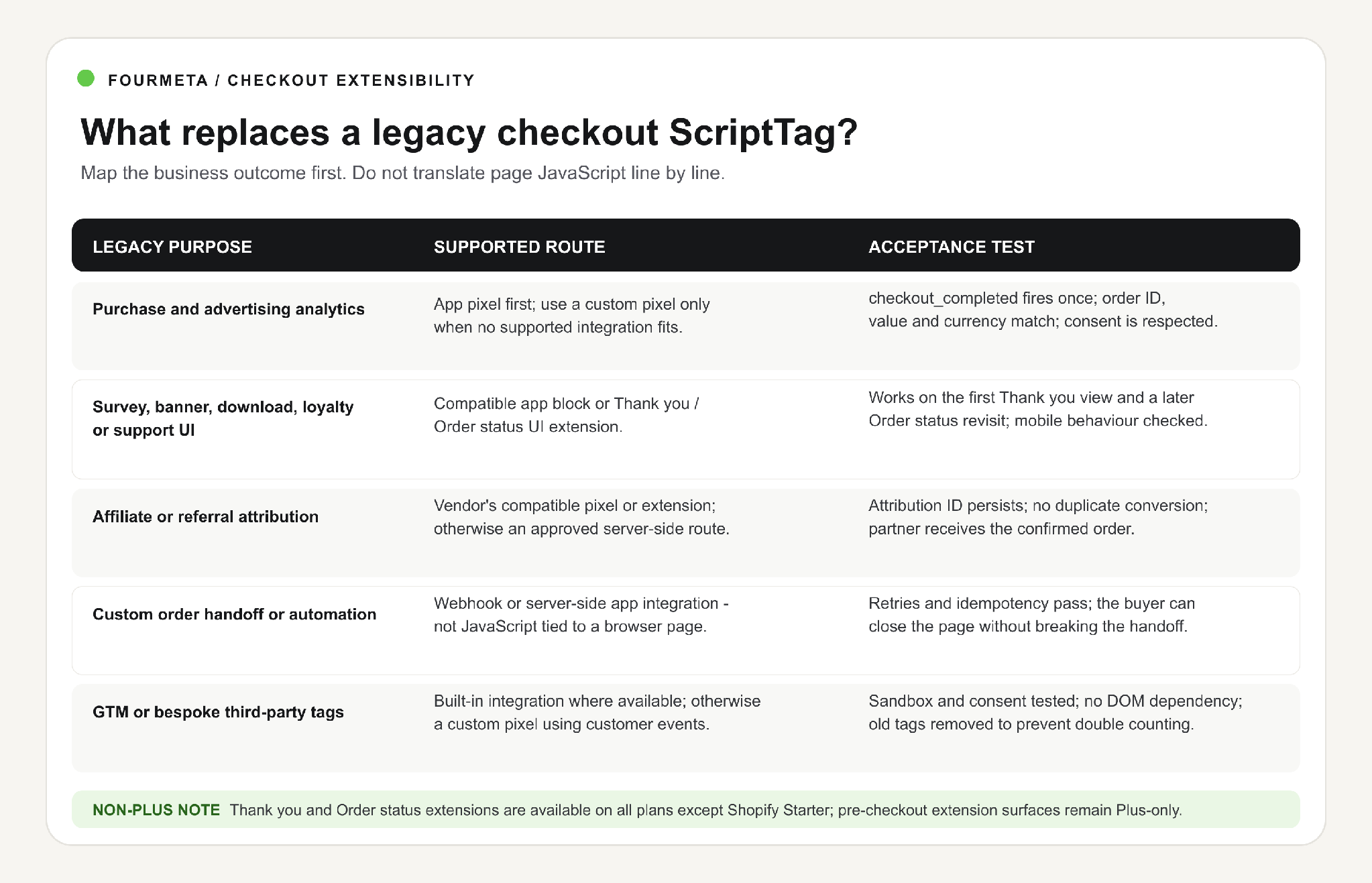
Use the business outcome to choose the migration route; then define an acceptance test.
Cutover risk scan: If the upgrade guide lists several incompatible apps or an unnamed custom ScriptTag, do not click Upgrade on the assumption that the app vendor handled it. Ask Fourmeta to map the exposed logic.
The non-Plus migration checklist
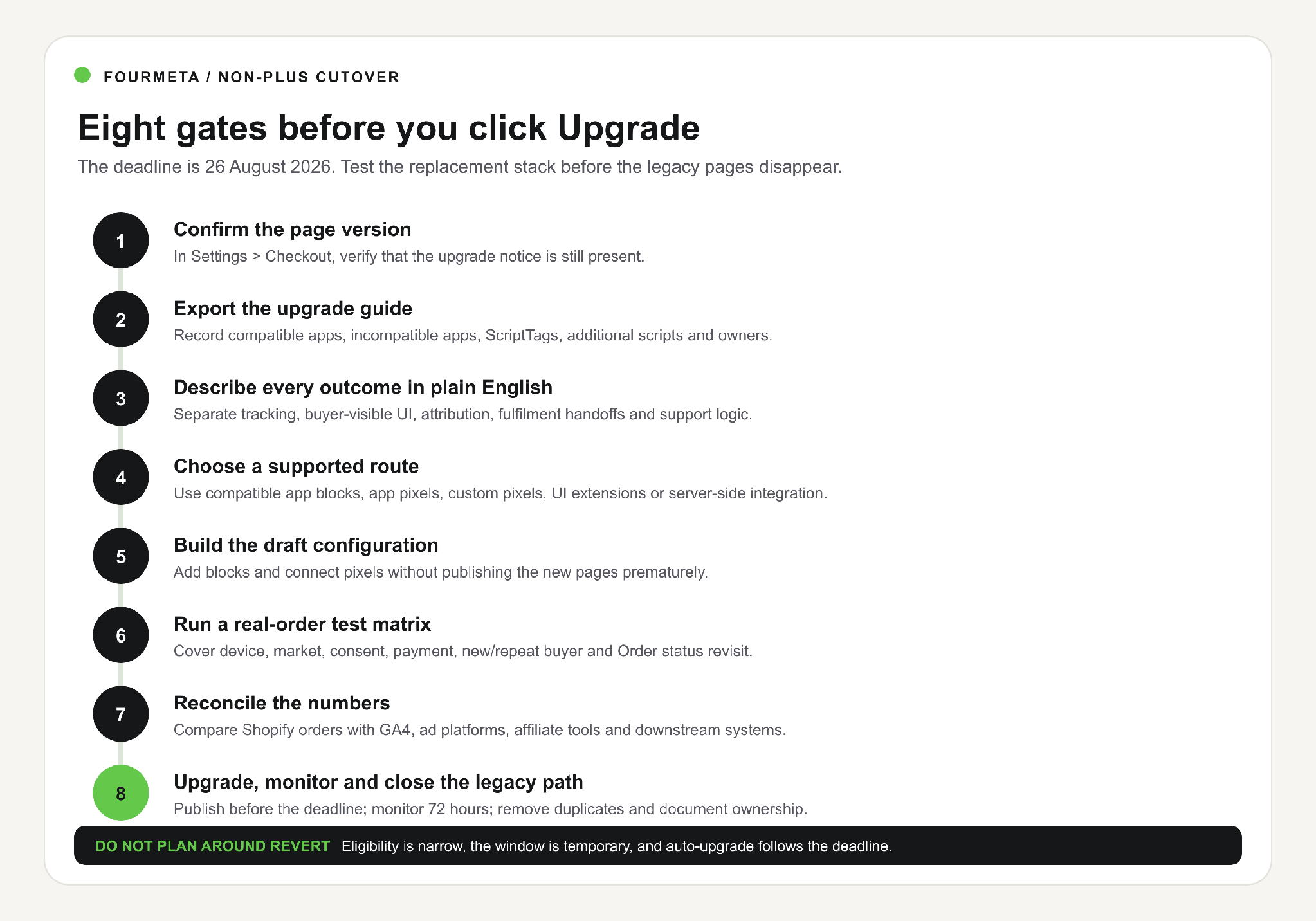
Complete all eight gates before publishing the new Thank you and Order status pages.
1. Confirm the page version and the store plan
The non-Plus guide applies to Basic, Grow, Advanced and other non-Plus subscriptions. Pause and Build stores are upgraded automatically. Shopify Plus stores followed an earlier deadline and a different guide.
Also check whether the store is on Shopify Starter. Shopify documents Thank you and Order status extensions as available on all plans except Starter. Extensions on the information, shipping and payment steps remain Plus-only. Do not design a Plus-only pre-checkout solution for a non-Plus requirement.
2. Turn the upgrade guide into an owned inventory
Shopify automatically generates a personalised guide in the admin. Use it, but do not treat it as the full specification. Add the operational context Shopify cannot know:
- what the app or script is supposed to achieve;
- which team and channel depends on it;
- the data destination and required identifiers;
- whether it is required on the first Thank you view, later Order status visits or both;
- the failure impact: measurement gap, customer confusion, missed fulfilment action or direct revenue risk;
- the replacement owner, test evidence and cutover status.
If the upgrade report is empty, Shopify says you can proceed to the final page-replacement step. Still complete one real-order measurement test before release. An empty report does not validate every external dashboard.
3. Replace tracking with pixels, not page DOM scripts
Shopify's pixels and customer events system is the supported route for checkout analytics and marketing signals.
- Use an app pixel when the platform or vendor offers one. Shopify recommends this route because the integration can be maintained and updated by the app.
- Use a custom pixel only when no suitable app integration exists. Custom pixels are an advanced, developer-managed feature; Shopify does not support the custom code itself.
- Subscribe to customer events rather than scraping page markup. For purchase measurement, checkout_completed is normally the key event, with the required order, value, currency and line-item fields mapped explicitly.
- Treat consent as part of the technical specification. A pixel that fires in one test browser but ignores regional privacy settings is not production-ready.
Do not paste an old GTM or vendor snippet into a custom pixel and assume parity. Pixels run in a sandbox, and code that expects the top-level window, unrestricted cookies or arbitrary DOM access may fail or produce different data. Shopify provides a specific custom-pixel pattern for GTM; implement and test the event mapping deliberately.
4. Replace buyer-visible UI with app blocks or checkout UI extensions
Shopify supports Thank you and Order status customisations through checkout UI extensions and merchant-placed app blocks.
This is the right route for surveys, social sharing, download links, loyalty prompts, support messages and other buyer-facing content. Test both page contexts:
- Thank you page: the first confirmation immediately after checkout. The order may not yet be fully created, although an order ID is available.
- Order status page: the page a buyer sees on later visits, where the order is available and its status may have changed.
A block that works only on the first view is not equivalent to a legacy widget that buyers used from an email days later. Revisit behaviour must be a named acceptance test.
5. Move critical handoffs to server-side integrations
If legacy page JavaScript sends an order to an ERP, fulfilment provider, warranty system, affiliate platform or customer-data service, ask a harder question: should the process depend on the buyer's browser at all?
For business-critical actions, the safer route is normally a webhook or app-backed server-side integration with retries, idempotency and monitoring. The action should succeed even if the buyer closes the Thank you page immediately.
Fourmeta's ecommerce integration team can scope this separately from the page migration so a temporary analytics fix does not hide an operational single point of failure.
6. Build a draft configuration before publishing
Use Shopify's checkout and accounts editor to configure the new pages, add compatible blocks and connect app pixels. Keep the new configuration as a draft while you complete testing.
For incompatible apps, contact the vendor and ask for the exact replacement mechanism and supported version. If the vendor has not moved to blocks, UI extensions or pixels, choose an alternative or scope custom development. Do not keep an incompatible app merely because the rest of the application still works on the storefront.
7. Test a real-order matrix, not one happy path
At minimum, run test or low-value real orders across the combinations that matter to the store:
- desktop and mobile;
- guest and returning customer;
- UK and at least one material international market;
- consented and non-consented visitor where applicable;
- standard card and an accelerated wallet used by customers;
- discounted and full-price order;
- first Thank you view and a later Order status revisit;
- successful, cancelled, refunded and partially fulfilled states where downstream tools rely on them.
For each route, record expected and actual results in Shopify, GA4, ad platforms, affiliate systems, CRM and operational tools. A green checkout is not enough if purchase value is missing, a conversion is duplicated or a warehouse handoff never arrives.
8. Reconcile data, upgrade and monitor for 72 hours
Before cutover, compare a sample of Shopify orders with every downstream destination. After you click Upgrade, repeat the reconciliation at increasing volume:
- first internal or controlled order;
- first 10 live orders;
- first full trading day;
- 72-hour comparison by market, device and consent state.
Monitor event count, conversion value, missing order IDs, duplicates, affiliate attribution, page-extension errors and failed integration deliveries. Keep one owner responsible for the full 72-hour window; do not split the incident across marketing, engineering and operations without a decision-maker.
A practical non-Plus migration example
Imagine a non-Plus fashion brand processing 400 orders a day at a £95 average order value. Its legacy Order status ScriptTag does three jobs:
- sends a purchase event to an affiliate network;
- shows a post-purchase survey and loyalty prompt;
- calls a fulfilment endpoint from the buyer's browser.
That is not one replacement:
- the affiliate event should use the vendor's compatible app pixel or a tested custom/server-side integration;
- the survey and loyalty prompt should use a compatible app block or a Thank you / Order status UI extension;
- the fulfilment action should move to a webhook or server-side app integration with retry handling.
The brand processes about £38,000 in daily gross order value in this illustration. If 15% of purchase events disappear after cutover, £5,700 per day can vanish from marketing reporting even though the orders still exist in Shopify. That is not automatically lost sales, but it can distort ROAS, affiliate payouts and automated campaign decisions. If the browser-based fulfilment call also fails, the impact becomes operational rather than only analytical.
The acceptance test therefore checks more than a visible Thank you page: 20 representative orders, zero duplicate purchase events, order ID/value/currency parity, valid attribution, successful fulfilment delivery with retries and correct UI on both initial and revisit states.
When an app is enough - and when custom development is justified
Use a compatible public app when the requirement is standard and the vendor already provides an app pixel or block: mainstream advertising, reviews, surveys, loyalty, downloads or common attribution flows. That is usually faster and cheaper than custom development.
Consider custom work when:
- the legacy ScriptTag combines several systems or business outcomes;
- the data mapping or attribution rules are proprietary;
- buyer-facing content needs brand-specific logic or authenticated data;
- a critical handoff must become server-side and observable;
- no compatible app preserves the required outcome;
- the store needs an owned configuration interface rather than hard-coded rules.
Fourmeta should not sell a custom app where a maintained public integration solves the problem. The commercial opportunity is the gap: audit the current behaviour, select the smallest supported architecture, implement the missing extension/pixel/integration and prove parity through real orders.
Common cutover mistakes
Assuming installed means compatible
An app can still work on product and cart pages while its checkout ScriptTag is obsolete. Use the upgrade guide and vendor documentation, then test the exact post-purchase feature.
Counting the same purchase twice
Running an app pixel and a custom pixel for the same destination can duplicate conversions. Disconnect or modify the old route and reconcile order IDs before scaling traffic.
Testing only the Thank you page
Buyers revisit Order status from confirmation emails. Test the later page, logged-out behaviour and changing fulfilment states.
Treating custom pixels like normal page JavaScript
The sandbox, consent rules and event schema change what code can access. Rebuild the data flow around customer events instead of copying DOM-dependent code.
Using a Plus-only solution for a non-Plus store
After-purchase Thank you and Order status extensions are broadly available, except on Starter. Extensions on information, shipping and payment steps are Plus-only. Confirm the target before development.
Relying on the revert window
Shopify's non-Plus guide allows a narrow temporary revert only when the store was created before 6 January 2025, already had qualifying legacy customisations and was manually upgraded less than 30 days earlier. Revert is unavailable after the deadline and auto-upgrade still follows. Treat it as emergency containment, not a migration plan.
Non-Plus Checkout Cutover Assessment
If your store still shows the upgrade notice, Fourmeta can turn the personalised guide into a scoped release plan. The assessment covers:
- the legacy apps, ScriptTags and additional scripts that need evidence;
- the supported route for each business outcome;
- non-Plus plan and extension constraints;
- duplicate or missing purchase-event risk;
- the real-order acceptance matrix;
- the cutover sequence, monitoring owner and recovery path.
Request my checkout cutover assessment - share the store URL and a screenshot or export of the upgrade guide. No generic platform migration deck: the first output is a risk map and next safe action.
If the gap requires bespoke implementation, see Fourmeta's Shopify app development service for pixels, extensions and app-backed workflows.
Frequently asked questions
When do Shopify checkout ScriptTags stop working for non-Plus stores?
Shopify states that legacy ScriptTags on the Thank you and Order status pages stop working for non-Plus stores on 26 August 2026. ScriptTags created before 1 February 2025 could continue for existing installs until that deadline; new checkout-page ScriptTags have been blocked since then.
Does the deadline affect every ScriptTag on my storefront?
No. The 26 August deadline is for ScriptTags on the legacy checkout Order status / Thank you experience. It is not a blanket shutdown of every theme JavaScript file. Vintage-theme ScriptTag use is a separate online-store concern, although theme app extensions are the modern route.
Can non-Plus stores use checkout UI extensions?
Thank you and Order status extensions are available on all plans except Shopify Starter. Extensions that render on the information, shipping and payment steps are Shopify Plus-only.
Should tracking move to an app pixel or a custom pixel?
Use an app pixel when a maintained vendor integration exists. Use a custom pixel when no suitable app integration meets the requirement and you can own the code, consent settings, sandbox limitations, testing and maintenance.
Can I still use Google Tag Manager?
Yes, Shopify documents a custom-pixel implementation for GTM. It is not the same as placing the standard container directly in page code: event mapping, sandbox behaviour, consent and duplicate tags must be tested.
Are additional scripts and ScriptTags the same?
No. Additional scripts were merchant-entered snippets in checkout settings; ScriptTags were app-created remote scripts. Both belong to the legacy post-purchase stack and must be inventoried, but the mechanisms differ. The additional scripts field has been view-only since 28 August 2025.
Can I revert after upgrading?
Only temporarily and only if Shopify's eligibility conditions are met: the store was created before 6 January 2025, qualifying legacy customisations already existed and the manual upgrade happened less than 30 days ago. Revert is not available after 26 August 2026.
Are Shopify ScriptTags the same as Shopify Scripts?
No. ScriptTags inject remote JavaScript into pages. Shopify Scripts were Ruby programs for line-item, shipping and payment logic, and they stopped executing on 30 June 2026. Read the Shopify Scripts Functions recovery guide for that separate issue.
What happens if I miss the deadline?
Checkout-page ScriptTags stop working, and Shopify's non-Plus guide says stores that have not upgraded will be auto-upgraded to the new Thank you and Order status pages. Unrecreated legacy customisations will be lost. After the date, treat missing measurement or functionality as a recovery incident: inventory the old outcome, implement the supported route and reconcile real orders.
Upgrade the page - but protect the outcome
The deadline is not just a page-template change. It is a forced move from ungoverned browser scripts to supported apps, pixels, extensions and integrations. That can improve security and maintainability, but only if the commercial outcomes survive the move.
For non-Plus stores, the practical sequence is simple: open the upgrade guide, map every outcome, choose the smallest supported replacement, test real orders, reconcile every destination and monitor the first 72 hours.
Request a non-Plus checkout cutover assessment or, if your discount, delivery or payment logic failed after 30 June, use the Shopify Scripts recovery guide.