

A Visualsoft-to-Shopify migration is not a product CSV exercise. It is a controlled replatforming programme across four connected systems: URLs and search signals, commercial data, integrations and the live operating process. The safest route is to inventory the current Visualsoft store, define a Shopify target model, migrate in the correct dependency order, reconcile every critical record type and launch only when the SEO, data and integration release gates have passed.
Shopify supports CSV, migration apps, partner-led migration and custom API routes, but no single method covers every store. Product structure, historical orders, customer accounts, redirects, feeds and third-party workflows often need different approaches. Shopify also states that the order of import matters: products first, then customers, then historical orders so the records can be connected correctly.
If you need the source and target architecture reviewed before scope is fixed, Fourmeta's Shopify migration specialists can identify the highest-risk gaps and the evidence required for a safe cutover.
Before you choose a migration tool, map the risks. Send Fourmeta your current store URL, indicative catalogue size and critical systems. We will identify the URL, data, integration and cutover questions that should be resolved before scope is locked. Request a Visualsoft Migration Risk Assessment.
What makes a Visualsoft-to-Shopify migration different?
Every source platform has its own data model, URL patterns, catalogue rules and integration contracts. The difficulty is rarely moving a product title from one database to another. It is preserving what the old system means.
For a Visualsoft store, discovery should answer five questions before development begins:
- Which pages and URL types drive organic revenue, backlinks and paid landing-page traffic?
- How are products, options, variants, categories, customer groups and commercial rules represented in the source data?
- Which customer, order, refund, credit, consent and account-history records must be available after launch?
- Which integrations or feeds currently create, enrich or consume products, inventory, prices, customers and orders?
- What is the smallest cutover window in which new orders, customers, stock and content can be reconciled safely?
Do not assume that a source connector, custom feed or Visualsoft-native workflow transfers to Shopify. Preserve the business outcome, then choose the Shopify app, API or custom integration that can reproduce it with clear ownership and monitoring.
This is not a criticism of either platform. Visualsoft now also markets Shopify migration services. The practical point is that source access, export depth and target architecture vary by merchant, configuration and contract. Confirm them with evidence.
The migration control model
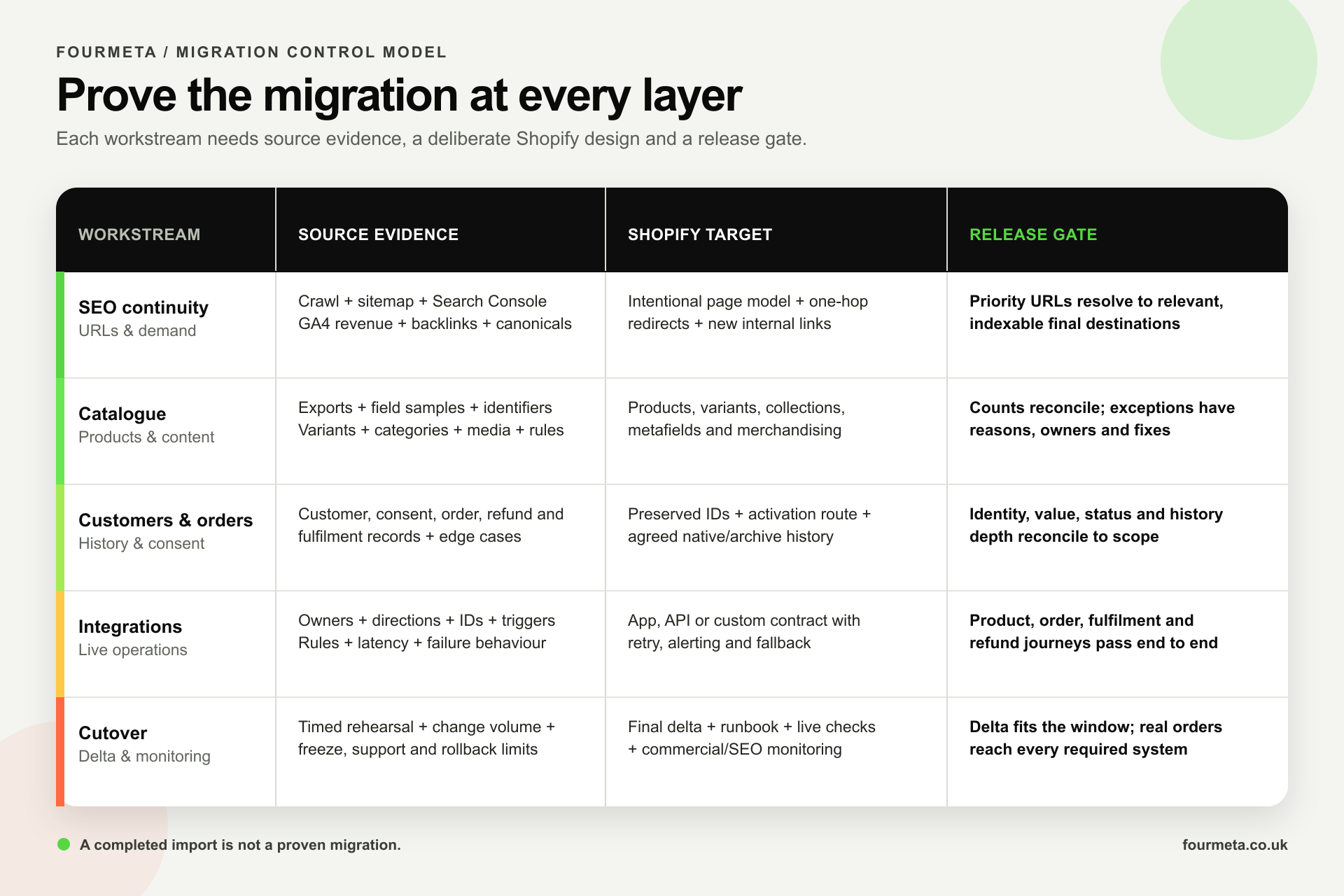
Alt text: Visualsoft-to-Shopify migration control matrix showing source evidence, Shopify target design and release gates for SEO, catalogue data, customer and order data, integrations and cutover.
Treat each workstream as a controlled contract: source evidence, target design and a measurable release gate.
The programme should have five workstreams, each with a named owner and an acceptance gate:
- SEO continuity: a complete URL inventory, intentional one-to-one or consolidation mapping, working permanent redirects and post-launch monitoring.
- Catalogue and content: a documented source-to-target data dictionary and reconciled products, variants, collections, media and merchandising content.
- Customers and orders: an agreed history depth, preserved identifiers and consent, an account activation plan and reconciled order/refund records.
- Integrations: a contract for every system, including direction, trigger, identifier, retry behaviour, alerting and manual fallback.
- Cutover and measurement: a rehearsal, delta plan, launch runbook, rollback criteria and live revenue/analytics checks.
A completed import is not a proven migration. Fourmeta can turn your source exports, URL inventory and integration list into a testable migration plan with record counts, owners and release gates. Get the migration risks mapped.
Phase 1: inventory the Visualsoft source before designing Shopify
Confirm access, ownership and export routes
List every source you need and who can supply it. That normally includes the Visualsoft admin, analytics, Search Console, product and customer exports, order history, media, redirects, content, DNS, payment and shipping settings, feeds and the credentials or contacts for third-party systems.
Confirm early:
- which data can be exported directly and in what format;
- whether stable source identifiers are included;
- whether complete order line, payment, refund and fulfilment history is available;
- how images and downloadable assets are addressed;
- who owns the domain, DNS and external tracking containers;
- whether any custom source code, feed, script or integration documentation exists; and
- which access or data-retention terms apply to the current contract.
If a critical field is absent from the standard export, identify the API, supplementary report or controlled transformation needed before committing to a launch date.
Crawl the real store, not just the sitemap
A sitemap is useful but does not prove the full indexable footprint. Crawl the store and combine the result with:
- Google Search Console landing pages, impressions, clicks and queries;
- GA4 landing-page sessions, revenue and conversion rate;
- Ahrefs pages with backlinks and ranking keywords;
- paid-media landing pages and tracked campaign URLs;
- internal search, filter and faceted-navigation patterns;
- XML sitemaps, canonical targets and hreflang annotations; and
- server or CDN logs where scale and risk justify them.
The result is a master URL inventory with page type, status, canonical, indexability, organic value, backlink value, traffic, revenue and intended Shopify destination.
Build a source-to-target data dictionary
For every object, document the source field, example value, Shopify destination, transformation rule, default, validation rule and owner.
The catalogue dictionary should cover:
- source product and variant identifiers;
- title, description and search copy;
- SKU, barcode, vendor and product type;
- options, variants and variant-level media;
- categories and subcategories mapped to Shopify collections, taxonomy and navigation;
- attributes mapped to options, standard fields, metafields or metaobjects;
- price, compare-at price, cost, tax status and market-specific rules;
- inventory location, available quantity and overselling rules;
- weights, dimensions, dangerous-goods or shipping attributes;
- bundles, kits, subscriptions, pre-orders and gift-with-purchase rules;
- related products, upsells and merchandising relationships;
- digital downloads, manuals and technical files; and
- SEO title, meta description, handle and image alt text.
This dictionary prevents silent simplification. A field should be deliberately migrated, transformed, rebuilt or retired—never merely omitted because the import completed without an error.
Inventory integrations by commercial outcome
Visualsoft's own replatforming checklist recommends mapping every third-party service and marketplace before migration. Use that principle, but go deeper than a vendor list.
For each ERP, PIM, OMS, WMS, 3PL, CRM, finance platform, marketplace, payment service, shipping tool, search engine, review platform, returns portal, subscription system, loyalty programme, affiliate feed and analytics destination, record:
- the business owner and technical owner;
- the data direction and system of record;
- the trigger or schedule;
- the identifier used to join records;
- expected volume and latency;
- transformations and business rules;
- authentication and environment;
- retry, duplicate prevention and idempotency behaviour;
- error alerts and dashboards;
- manual fallback; and
- acceptance tests.
An integration is not “done” when a test payload returns 200. It is done when the commercial workflow succeeds, failures are visible and the team knows how to recover.
Phase 2: protect SEO during the platform move
Google treats a replatform that changes URLs as a site move. Temporary ranking movement can happen while the old and new URLs are recrawled and reprocessed. The objective is not to promise zero fluctuation; it is to preserve relevance and make every change explicit.
For deeper platform-agnostic guidance, use Fourmeta's Shopify migration guide for preserving SEO and data integrity.
1. Establish the pre-launch baseline
Export at least the following before any URL changes:
- top organic landing pages by clicks, impressions, revenue and assisted conversions;
- ranking queries and the page currently serving each intent;
- pages with valuable backlinks and referring domains;
- indexed page counts by product, category, content and filter type;
- current titles, descriptions, headings, canonicals, robots directives and structured data;
- crawl depth and internal-link counts; and
- branded and non-branded organic performance.
Save the crawl and exports. They are the comparison point for launch validation, not optional research notes.
2. Classify every URL pattern
Separate products, categories, subcategories, brands, guides, blog posts, help pages, search results, filters, pagination, customer routes, campaign pages and discontinued content.
For each pattern, decide whether it should:
- keep an equivalent indexable page on Shopify;
- consolidate into a stronger relevant page;
- remain available but not indexable;
- be retired with a true 404 or 410; or
- redirect to the closest useful replacement.
Do not redirect every retired URL to the home page. Google warns that irrelevant mass redirects can be treated as soft 404s.
3. Build the redirect map before handles are final
Create an exact old-to-new map using the master URL inventory. Prioritise pages with traffic, revenue, rankings or backlinks, but cover the complete useful URL set.
Shopify can import URL redirects by CSV, but it restricts redirects for certain reserved paths, including routes beginning with `/apps`, `/cart`, `/orders`, `/services` and `/shop`. Identify conflicts early and design a route or application-level solution rather than discovering them at launch.
Use permanent server-side redirects where possible, point directly to the final destination and avoid chains. Google's current guidance recommends keeping redirects for at least one year; retaining valuable redirects indefinitely is often better for users and long-lived external links.
4. Rebuild relevance, not only destinations
The target page must preserve the user's intent and the useful content signals that supported the old URL. Validate:
- primary topic and search intent;
- title tag, meta description and H1;
- substantive product or category copy;
- indexable product availability and variant handling;
- image alt text and media accessibility;
- Product, Breadcrumb, Organisation and relevant article structured data;
- self-referencing canonicals on new indexable URLs;
- hreflang for international variants; and
- clean robots and noindex rules.
A technically correct redirect cannot compensate for a destination that no longer answers the query.
5. Update internal links and discovery signals
Update navigation, breadcrumbs, collection links, blog links, banners, XML feeds, email templates and campaign destinations so they point directly to final Shopify URLs.
Shopify generates a `sitemap.xml`. Submit the new sitemap in Search Console after launch and monitor the indexed, not-indexed, 404 and redirected URL patterns. If the domain itself changes, follow Google's Change of Address process; if only paths change on the same domain, that step is not required.
6. Validate redirects at scale
Test all priority and mapped URLs against the live target and flag:
- 404 or 5xx responses;
- chains and loops;
- redirects to irrelevant destinations;
- new pages canonicalised to old or staging URLs;
- accidental noindex or robots blocking;
- redirect destinations that themselves redirect; and
- old high-value URLs absent from the map.
The SEO release gate should be quantitative: for example, 100% of priority URLs and an agreed percentage of all valuable URLs return one-hop permanent redirects to relevant, indexable destinations, with zero critical canonical or robots defects.
Phase 3: migrate and reconcile ecommerce data
Shopify recommends transferring products before customers and historical orders. That sequence matters because customer and order records may need to reference products that already exist.
Products, variants and collections
Do not compare only total product counts. Reconcile at the level at which the business operates:
- source products to Shopify products;
- source options and variations to Shopify variants;
- SKU and barcode uniqueness;
- active, draft and archived status;
- product-to-collection membership;
- inventory quantities by location;
- price, compare-at price, cost and tax flags;
- image and file counts;
- metafield values and types;
- bundle and subscription relationships; and
- market or channel publication.
Shopify CSV import is suitable for many standard catalogue fields, but some content and behaviours require an app, API or custom migration. Choose per object, not through one tool for the entire programme.
Customer accounts, consent and activation
Shopify's customer CSV can import customer details, addresses and certain fields, but it cannot import orders. Customer passwords cannot be migrated because they are encrypted outside Shopify. Build an account activation and communication plan instead of treating the missing password as a launch-day surprise.
Validate:
- unique customer identities and duplicate rules;
- email and phone formatting;
- default and additional addresses;
- customer tags and segmentation;
- B2B company/location relationships where relevant;
- marketing consent source, timestamp and lawful basis where available;
- loyalty identifiers and balances;
- tax exemption and commercial status; and
- the exact journey for customers to activate or access their Shopify account.
Do not silently opt customers into marketing or overwrite more recent preferences during a delta import.
Historical orders, refunds and service continuity
Shopify lists migration apps, the Order API and Transaction API as routes for historical orders. Customer CSV is not an order-migration route.
Define what “order history” means to the business. It may include:
- order number and source identifier;
- customer link;
- line items, SKU and quantity;
- prices, discounts, tax and shipping;
- payment and financial status;
- fulfilments and tracking;
- cancellations, returns, refunds and credits;
- notes, tags and sales channel;
- gift-card or store-credit impact; and
- timestamps required by customer service, finance and analytics.
Shopify warns that importing historical orders can trigger new-order emails to staff configured for those notifications. Control notifications before the import and test the operational impact in a non-production rehearsal.
Decide whether all historical orders must be native Shopify objects, whether older records can be held in a governed archive or service view, and which period customer service actually needs. The answer changes cost, complexity and validation depth.
Content, media and merchandising
Products are only part of the customer journey. Include:
- pages, blog articles and FAQs;
- buying guides and category content;
- policies, delivery and returns information;
- navigation, menus and breadcrumbs;
- size guides, manuals and downloads;
- landing pages used by paid campaigns, affiliates or email;
- reviews and question-and-answer content;
- search synonyms, boosts and merchandising rules; and
- media files with accessible alt text.
Preserve dates, authorship and canonical intent for editorial content where they matter. Do not recreate valuable guides as thin fragments across unrelated pages.
Reconcile with counts, samples and business rules
Each import should produce a reconciliation report containing:
- source count;
- transformed count;
- imported count;
- rejected count;
- duplicate count;
- intentionally excluded count;
- exception reason; and
- remediation owner.
Then sample high-value and edge-case records: the largest products, unusual variants, zero-stock items, multi-address customers, refunded orders, discounted orders, international tax cases and orders spanning multiple fulfilments.
Totals prove coverage. Samples prove meaning.
Phase 4: redesign integrations for Shopify
The migration is not complete if Shopify holds correct data only at launch. The operating systems must keep it correct afterwards.
Define the system of record
For each object—product, price, inventory, customer, order, fulfilment, refund and return—name one authoritative system and the permitted update directions.
Ambiguous ownership creates loops and race conditions. For example:
- a PIM may own product content but Shopify may own merchandising collections;
- an ERP may own available stock while Shopify reserves inventory during checkout;
- Shopify may create orders while an OMS owns fulfilment status;
- a CRM may own account segmentation but Shopify owns storefront consent capture.
Document those boundaries and reject writes that violate them.
Preserve stable identifiers
Keep source IDs in controlled Shopify metafields or integration storage where appropriate. Maintain an explicit mapping between Visualsoft source IDs, Shopify global IDs, ERP SKUs and marketplace identifiers.
Do not rely on mutable labels such as titles, customer names or collection names to join systems.
Build for retries and duplicates
Every production integration should answer:
- What happens if Shopify or the downstream system is unavailable?
- Can the same event be processed twice without creating a duplicate?
- How is an out-of-order update handled?
- Where are rejected records visible?
- Who receives the alert?
- Can operations replay a failed message safely?
- What is the manual fallback during an incident?
If the answer is “check the logs”, the operational design is incomplete.
Test end-to-end commercial journeys
API unit tests are not sufficient. Run representative journeys from source to financial outcome:
- publish or update a product and verify storefront, feed and search visibility;
- change price or inventory and confirm correct latency;
- place card, wallet, discount, international and high-value orders;
- allocate, fulfil, cancel and partially refund orders;
- create and update customer consent;
- run a return or exchange; and
- verify marketplace, CRM, finance and analytics outputs.
The acceptance gate should include expected data in every connected system, not just Shopify.
When a migration app is enough—and when custom work is justified
A migration app or standard CSV route can be enough when:
- the catalogue is structurally standard;
- products, customers and content are available in clean supported formats;
- limited historical order detail is required;
- there are few custom identifiers or commercial rules;
- integrations can be replaced by established Shopify apps; and
- the business can validate and correct manageable exceptions manually.
A custom migration or hybrid approach is usually justified when:
- product attributes, variants, bundles or categories do not map cleanly;
- hundreds of thousands of customer or order records must preserve relationships;
- historical payments, refunds, fulfilments or credits need controlled representation;
- source IDs must remain stable across ERP, 3PL, CRM and marketplaces;
- multiple delta imports are required during a long build;
- complex B2B pricing or customer hierarchies exist;
- specialised feeds or business rules must be rebuilt; or
- the cost of a silent data error is materially higher than the engineering cost of reconciliation.
The sensible answer is often hybrid: CSV for suitable product fields, APIs or specialist apps for customers and historical orders, custom transformations for non-standard objects, and independent reconciliation across all methods.
Phase 5: rehearse the cutover and delta migration
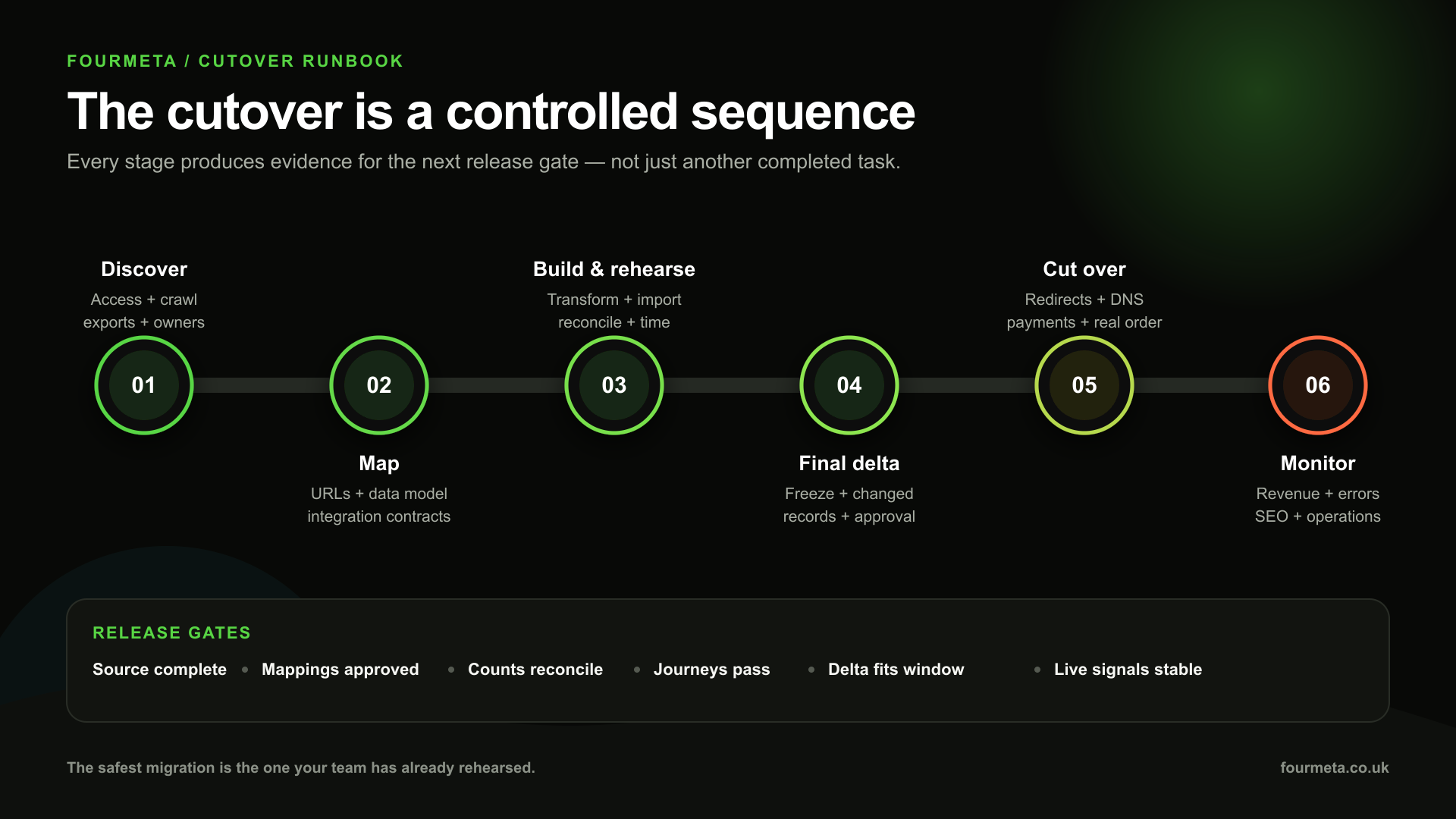
Alt text: Six-stage Visualsoft-to-Shopify cutover timeline covering discovery, mapping, build, rehearsal, delta migration, launch and monitoring gates.
The cutover is a controlled sequence, not a DNS event. Each stage must produce evidence for the next release gate.
For broader programme planning, see Fourmeta's ecommerce replatforming and migration guide.
Run at least one full rehearsal
Use representative source exports and production-like volumes. Record:
- export, transform and import duration;
- throughput and API constraints;
- rejected and duplicate records;
- reconciliation results;
- integration queue behaviour;
- redirect validation time;
- storefront and checkout regression results; and
- the exact manual steps that remain.
The rehearsal turns assumptions into a timed runbook.
Define the delta window
An initial migration becomes stale while the new store is being tested. New products, customers, orders, refunds, inventory and content created after the extraction point must be handled through one or more delta migrations.
For each changing object, define:
- the initial cutoff timestamp;
- how new and updated records are detected;
- the unique source identifier;
- conflict rules;
- the final freeze or reduced-change window;
- who approves the final delta; and
- the reconciliation required before launch.
Avoid broad “copy everything again” imports that can overwrite newer target data or duplicate historical records.
Build a launch command centre
The cutover runbook should specify owner, time, evidence and rollback decision for:
- source change freeze;
- final data export and delta import;
- product, customer and order reconciliation;
- redirect upload and validation;
- DNS and domain changes;
- payment, tax, shipping and checkout tests;
- analytics, consent, pixels and server-side tracking;
- email, SMS and operational notifications;
- marketplace and feed activation;
- real test orders through fulfilment and refund;
- customer-account activation communication;
- support and incident ownership; and
- launch approval.
Monitor commercial signals, not only errors
In the first hours and weeks, monitor:
- revenue, orders, conversion rate and average order value versus the agreed baseline;
- checkout and payment failures;
- product availability and inventory exceptions;
- integration queue failures and latency;
- 404s, redirect misses, canonical errors and index coverage;
- organic landing-page clicks and rankings by old/new URL pair;
- paid landing-page and feed errors;
- customer login and support contacts; and
- refunds, fulfilment and return exceptions.
Set thresholds and owners before launch. “Watch GA4” is not an incident process.
An illustrative £12m migration example
Consider a £12m UK ecommerce brand with 14,000 active product variants, 180,000 customer records, five years of order history, 28,000 indexable URLs and eight connected systems, including an ERP, 3PL, Klaviyo, reviews, returns, marketplaces, product feeds and GA4.
The highest risks are not the headline counts. They are relationships:
- category and filtered landing pages generate 62% of non-brand organic revenue;
- 1,900 old URLs have backlinks;
- the ERP SKU is stable, but product titles and category names change;
- some refunded orders contain multiple fulfilments;
- loyalty balance is stored outside Visualsoft;
- the 3PL requires the source order identifier; and
- stock continues changing until the final delta.
A defensible release plan would set evidence-based gates such as:
- every priority organic and backlink URL has a tested, relevant one-hop redirect;
- product, SKU, price, collection and media counts reconcile to agreed exclusions;
- all customers have a preserved source identifier and consent mapping;
- the agreed order-history period reconciles by order count and gross value, with edge cases sampled;
- every integration has passed end-to-end order, cancellation, fulfilment and refund journeys;
- the final delta duration fits inside the operational freeze window; and
- live test orders reach payment, ERP, 3PL, CRM and analytics destinations correctly.
This is an illustrative control model, not a Fourmeta case-study result. Its purpose is to show how commercial risk becomes measurable acceptance criteria.
Visualsoft-to-Shopify migration checklist
Discovery and ownership
☐ Current contract, data ownership, access and export routes confirmed.
☐ Product, customer, order, content, media and redirect exports sampled.
☐ Stable source identifiers identified for every critical object.
☐ Current store crawled and combined with Search Console, GA4, Ahrefs and paid landing-page data.
☐ All integrations, feeds, scripts, marketplaces and operational owners inventoried.
☐ Shopify plan, market, location, checkout and account requirements confirmed.
SEO
☐ Master URL inventory classified by page type, value and target action.
☐ One-to-one and consolidation redirect map approved before handles are locked.
☐ Reserved Shopify paths and redirect constraints checked.
☐ Titles, headings, copy, canonicals, hreflang and structured data mapped.
☐ Internal links, navigation, breadcrumbs, campaigns and feeds updated to final URLs.
☐ Redirects tested at scale for status, destination, relevance, chains and loops.
☐ New sitemap submitted and Search Console monitoring dashboard prepared.
☐ Redirect retention owner and one-year minimum review date documented.
Catalogue and content
☐ Source-to-target data dictionary approved.
☐ Product, variant, SKU, barcode, price, tax and inventory mappings tested.
☐ Categories and attributes mapped to collections, taxonomy, metafields and metaobjects.
☐ Images, alt text, downloads and editorial content accounted for.
☐ Bundles, subscriptions, search, merchandising and recommendation rules rebuilt or retired deliberately.
☐ Import order and dependency sequence documented.
☐ Reconciliation reports produced with exclusions and exception owners.
Customers and orders
☐ Customer identity, addresses, tags, consent and B2B relationships mapped.
☐ Password limitation acknowledged and account activation journey prepared.
☐ Required order-history depth agreed with service, finance and data teams.
☐ Orders, transactions, discounts, tax, fulfilments, cancellations and refunds sampled.
☐ Historical-order notification settings controlled before import.
☐ Gift card, credit, loyalty and review migration routes agreed.
☐ Delta logic prevents duplicate or stale customer and order data.
Integrations and operations
☐ System of record named for products, prices, inventory, customers, orders and refunds.
☐ Stable identifiers preserved across Shopify and connected systems.
☐ Direction, trigger, transformation, retry, idempotency and alerting documented.
☐ Manual fallback and incident owner defined.
☐ End-to-end product, order, fulfilment, cancellation, refund and return tests passed.
☐ Finance, CRM, marketplace, feed and analytics outputs validated.
Cutover and post-launch
☐ Full-volume rehearsal completed and timed.
☐ Initial extraction, delta detection, final freeze and conflict rules agreed.
☐ Redirects, DNS, payment, tax, shipping, analytics and consent steps in the runbook.
☐ Rollback criteria and decision owner documented.
☐ Real launch test orders pass through every connected system.
☐ Revenue, conversion, checkout, integration and SEO alerts configured.
☐ Daily exception and search-performance reviews scheduled for the first launch period.
Common migration mistakes to avoid
Choosing the migration tool before understanding the source
Tool selection should follow data and process discovery. Otherwise the team optimises for what the tool can import rather than what the business must preserve.
Mapping only products and customers
Revenue continuity also depends on URLs, discounts, tax, inventory, content, integrations, fulfilment, refunds, consent, feeds and analytics.
Treating a successful import as reconciliation
An import can complete while dropping images, flattening attributes, disconnecting orders, changing consent or duplicating customers. Compare counts and meaning.
Replacing valuable URLs with generic destinations
Redirect each valuable old URL to the closest relevant replacement. Mass home-page redirects create a poor experience and may be treated as soft 404s.
Migrating all history without an operating reason
More history is not automatically better. Agree what customer service, finance, compliance and analytics need, then choose the safest representation.
Testing APIs instead of business journeys
A valid payload does not prove that an order can be paid, fulfilled, cancelled, refunded and reported correctly across the stack.
Leaving the delta until launch week
The delta is part of the architecture. Rehearse how new and updated records will be detected, merged and reconciled.
Frequently asked questions
How do you migrate from Visualsoft to Shopify?
Start with a source inventory and target data model. Crawl and map URLs, export and transform catalogue/customer/order data, rebuild integrations, rehearse the import, run a controlled delta and launch only after SEO, data and operational reconciliation gates pass. Shopify supports CSV, migration apps, partner-led migration and custom API routes; most complex stores use a combination.
Can Visualsoft products be imported into Shopify?
Usually, but the route depends on the source export and catalogue complexity. Standard fields can often move through Shopify product CSV or a migration app. Non-standard attributes, variant structures, bundles, collection logic, media and identifiers may need transformation, APIs or custom work. Test representative edge cases before the full catalogue.
Can customer passwords move to Shopify?
No. Shopify states that customer passwords cannot be migrated because they are encrypted outside Shopify. Plan an account activation or password-creation journey and explain it clearly to customers.
Can historical orders move from Visualsoft to Shopify?
Yes, when the source data is available in sufficient detail. Shopify lists migration apps, the Order API and Transaction API as historical-order routes. Define the history depth and fields required, control notifications, preserve source identifiers and reconcile counts, values, fulfilments and refunds.
Will SEO traffic drop during the migration?
Some temporary fluctuation is possible while Google recrawls and reprocesses the changed URLs. The risk is reduced by preserving relevant content, mapping valuable URLs one-to-one, using permanent redirects, updating canonicals and internal links, submitting the new sitemap and monitoring old/new URL pairs in Search Console and analytics.
How long should redirects remain active?
Google recommends keeping site-move redirects for at least one year and as long as possible. For valuable legacy URLs and external links, retaining them indefinitely is often the most user-friendly option.
Do Visualsoft integrations transfer automatically to Shopify?
Do not assume so. Inventory each integration's commercial outcome, owner, direction, identifiers and failure handling. Then reproduce that outcome with an appropriate Shopify app, API or custom integration and test the full workflow end to end.
Is a migration app enough?
It can be enough for clean, standard catalogue/customer data and limited complexity. A hybrid or custom route is more defensible when the catalogue is bespoke, historical relationships matter, multiple systems share identifiers, deltas are complex or silent errors carry material commercial risk.
Do you need Shopify Plus to migrate from Visualsoft?
Not simply because the source platform is Visualsoft. The Shopify plan should be chosen for the target operating model: B2B features, markets, locations, checkout control, automation, API capacity and organisational requirements. Migration complexity and Shopify plan fit are related but separate decisions.
How much does a Visualsoft-to-Shopify migration cost?
Cost depends on source access, catalogue and history volume, URL footprint, design/build scope, number of integrations, data quality, B2B or international requirements, cutover constraints and validation depth. A scoped risk assessment is more reliable than a price based only on SKU count.
Conclusion: migrate the operating model, not just the files
The objective is not to make Shopify contain roughly the same records as Visualsoft. It is to preserve findability, commercial meaning and operational continuity while creating a cleaner target architecture.
That requires evidence: a complete URL map, a field-level data dictionary, reconciled imports, controlled identifiers, end-to-end integration tests, a rehearsed delta and measurable launch gates.
Plan the evidence before the cutover. Fourmeta's Shopify migration specialists can assess the source data, redirect model, integrations and operating risks, then design the lowest-risk route to Shopify. Request a Visualsoft Migration Risk Assessment.