
Shopify Scripts stopped working after Jun 30, 2026: diagnosis and Functions recovery

Shopify Scripts stopped executing on Jun 30, 2026. Shopify deactivated every published Script, so line-item, shipping and payment logic built in Script Editor no longer runs. The recovery route is to identify the lost rule, map it to the correct Shopify Function or public app, rebuild it, test it against real edge cases and deploy it with monitoring.
If discounts, delivery options or payment methods changed suddenly after 30 June, treat this as a revenue incident—not a theme bug.
Need the failure assessed? Fourmeta can review the affected journey, identify the likely replacement API and scope the safest recovery route. Request a Shopify Functions recovery audit.
What happened to Shopify Scripts on Jun 30, 2026?
Shopify ended Scripts in three stages:
- Editing and publishing new Scripts stopped on Apr 15, 2026.
- Every published Script stopped executing on Jun 30, 2026.
- Read-only access to Script Editor was scheduled to end on Jul 30, 2026.
That means an old Script can still exist in documentation, a repository or a team member’s memory while doing nothing in the live checkout. Shopify’s current migration guidance confirms that published Scripts were deactivated and no longer function.
Shopify Scripts are not the same as theme JavaScript
This deadline applies to the Ruby-based line-item, shipping and payment Scripts created through Shopify’s Script Editor. It does not mean that every JavaScript file in your theme stopped working.
It is also separate from legacy ScriptTags and “Additional scripts” on Thank you and Order status pages. For existing non-Plus implementations, Shopify lists a different Aug 26, 2026 ScriptTag deadline and recommends moving that functionality to UI extensions or Web Pixel extensions. We cover that separately later in this guide because the recovery path is different.
The five-minute diagnosis: is Shopify Scripts sunset the cause?
Start with a real order or checkout journey. Do not begin by installing another app or changing the theme.
- Choose one order from before 30 June and one from after. Match the market, customer type, products, quantities and discount code as closely as possible.
- Write down the expected rule in plain English. For example: “VIP customers receive 15% off full-price products, but sale items are excluded.”
- Compare the buyer-visible result. Check line prices, discounts, delivery methods, delivery prices and payment methods.
- Identify the old Script family. Was the logic changing line items, shipping or payments?
- Check the store plan and ownership model. This determines whether a public app or a custom app containing Functions is available to you.
Common symptoms and likely replacements
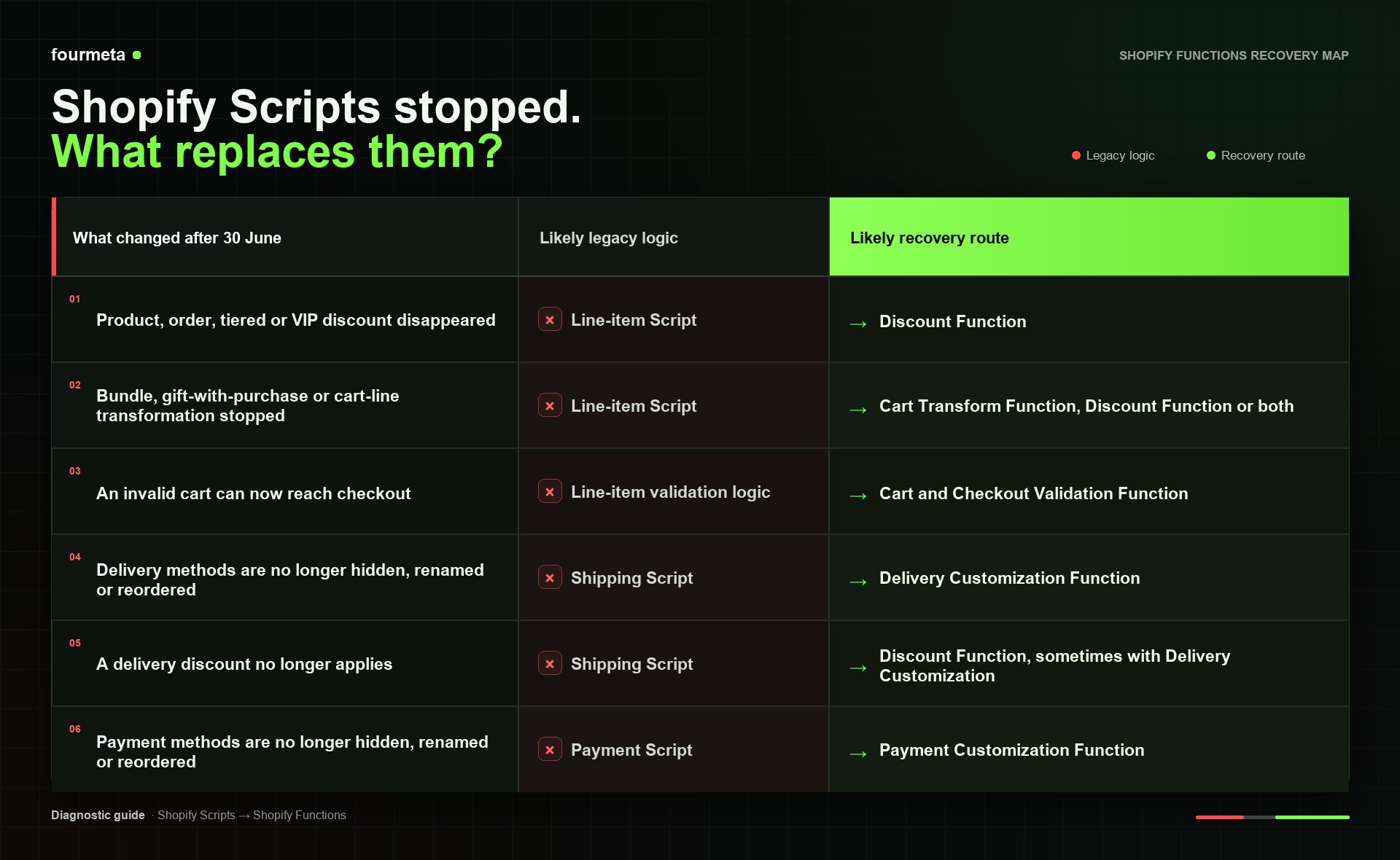
This is a diagnostic map, not a one-to-one migration promise. One Script may contain several business rules and need more than one Function API, an app configuration layer or a checkout extension.
Revenue-risk check: if the same symptom appears across several markets, customer groups or promotion types, stop treating it as a single checkout bug. Ask Fourmeta to map the affected logic.
What to do immediately if live revenue is affected
The first job is containment. Rebuilding comes next.
1. Stop promising behaviour the checkout no longer delivers
Pause campaign copy, cart banners and customer-service messages that advertise a discount, free delivery or payment option that no longer appears. A broken promise can damage conversion and create support costs even when the checkout technically completes.
2. Give customer service a temporary resolution rule
Document who qualifies, what they should receive and how the team should resolve affected orders. Keep a record of every manual discount, refund, delivery adjustment and complaint; those records help quantify the incident and become test cases for the replacement.
3. Capture evidence before changing the stack
Save screenshots, affected order IDs, customer tags, markets, products, discount codes and expected outcomes. If the original code is no longer available through Script Editor, look for repositories, deployment archives, internal documentation, Shopify’s Scripts customisations report or prior technical handover files.
4. Avoid a theme-only workaround for backend rules
Theme JavaScript can change what a buyer sees in the online store. It is not a reliable substitute for authoritative discount, delivery, payment or checkout validation logic. It may also miss accelerated wallets, apps, custom storefronts and emerging buying surfaces.
How to map Shopify Scripts to Shopify Functions
Shopify Functions run backend logic at defined points in the buying journey. Shopify invokes them when needed; they are not ordinary pages or endpoints that a buyer calls directly. The logic is compiled to WebAssembly, with official templates for Rust and JavaScript. Shopify strongly recommends Rust where performance and large-cart reliability matter.
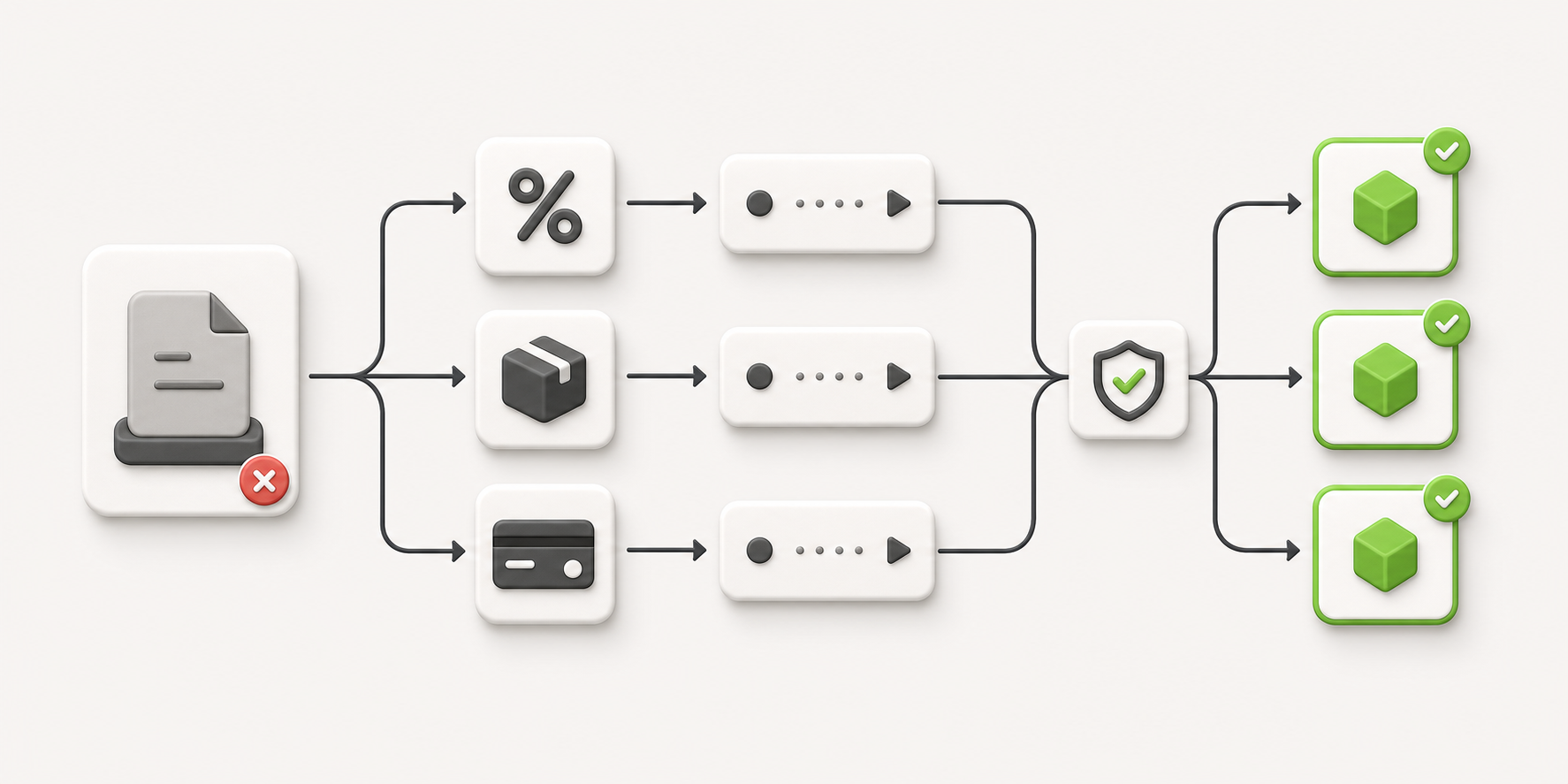
Inventory the lost rule, map each responsibility, test it and release the supported Function.
Line-item Scripts
Use a Discount Function when the business outcome is a product, order or shipping discount. Use Cart Transform when the cart lines themselves must be expanded, merged or updated. Use Cart and Checkout Validation when the rule should reject or block an invalid purchase.
A complex line-item Script may need all three. Recreate the commercial rule, not the Ruby structure.
Shipping Scripts
Use Delivery Customization to hide, rename or reorder delivery options. Use a Discount Function when the requirement is to reduce or remove a delivery charge.
Do not assume “free express over £120” is one rule. It may combine qualification, a delivery discount, delivery-option ordering, market exclusions and messaging in the storefront.
Payment Scripts
Use Payment Customization to hide, rename or reorder payment methods. Test country, currency, cart value, customer type, B2B context, gift cards, subscriptions and accelerated checkout where they matter to the business.
Validation logic
Use Cart and Checkout Validation for server-side rules that prevent an invalid cart from progressing. This is now the future-facing path for checkout enforcement: in API version 2026-07, Shopify deprecated useBuyerJourneyIntercept and recommends validation Functions for business rules, including across express wallets and agentic checkout.
Do Shopify Functions work on every Shopify plan?
Not in the same way.
- Stores on any plan can use public Shopify App Store apps that contain Functions.
- Only Shopify Plus stores can use custom apps that contain Shopify Function APIs.
- Some individual Function capabilities are Shopify Plus-only.
This is one of the most important decisions in the recovery. If the logic is genuinely brand-specific and commercially material, a Plus store may justify a custom Shopify app. A non-Plus store will normally need to select a suitable public app or reconsider the requirement.
Do not begin development before checking the current availability and limitations of the Function API you plan to use.
A safe Shopify Functions recovery process
Step 1: Turn old code into a business-rule inventory
For every rule, record:
- trigger: customer, product, market, quantity, price, code or time;
- exclusions: sale items, gift cards, subscriptions, bundles or B2B;
- action: discount, transformation, rejection, delivery change or payment change;
- priority when several rules apply;
- buyer-facing message;
- owner and commercial purpose.
This inventory exposes conflicts that the old Script may have hidden.
Step 2: Design the target architecture
Decide which rules belong in Discount, Cart Transform, Validation, Delivery Customization and Payment Customization Functions. Then decide where non-code configuration should live so a trading team can change thresholds, dates or customer segments without an engineering release.
For brand-specific logic, that often means a small app interface backed by metafields rather than values hard-coded throughout the Function.
Step 3: Build a test matrix before the Function
Cover the normal journey and the combinations that create revenue risk:
- guest, logged-in, VIP and B2B customers;
- UK and international markets;
- GBP and additional currencies;
- full-price, sale, bundle, subscription and gift-card products;
- one and multiple discount codes;
- carts just below, exactly at and just above each threshold;
- standard checkout and accelerated wallets;
- empty, normal and unusually large carts.
Expected outputs should be specific enough that a tester can say pass or fail without interpreting the rule.
Step 4: Validate in a development store, then use a controlled production release
Shopify recommends testing on a development store and monitoring Function execution details. Its migration guide also describes a short production validation period using tagged test customers before enabling the Function for everyone.
Because Scripts no longer run, untagged customers receive none of the replacement behaviour while a test-only condition remains in place. Keep that stage brief, remove the condition deliberately and monitor the live rollout.
Step 5: Monitor the commercial result, not only the logs
Confirm that the Function executed, but also check:
- qualifying checkout completion rate;
- discount cost and margin;
- delivery-method selection;
- payment-method selection and failure rate;
- customer-service contacts;
- manual adjustments and refunds;
- behaviour by market, device and customer segment.
Technical success is necessary. Commercial parity is the definition of recovery.
How to quantify the revenue leak
Use a simple incident model:
Affected checkout sessions × change in checkout completion × average order value = weekly revenue at risk
Illustrative example: a delivery rule affects 1,000 eligible checkouts a week. Completion falls from 72% to 68% and the average order value is £150. The directional revenue at risk is:
1,000 × 4% × £150 = £6,000 per week
This is not a forecast and should not be presented as recovered revenue without a clean comparison. Replace the assumptions with your store data, segment the affected journeys and account for promotions or other changes happening at the same time.
The same method can be applied to a missing discount, bundle or payment rule, but choose the outcome that the rule was intended to protect. For a payment customization, for example, payment failure rate may be more informative than gross conversion.
Common migration mistakes
Copying the Ruby line by line
Functions use different inputs, outputs and execution constraints. Reproduce the intended outcome and precedence, not the shape of the old code.
Replacing one large Script with one large Function
Separate responsibilities where the platform separates them. Discounting, cart transformation, delivery customization and payment customization are different concerns.
Hard-coding every commercial variable
Trading teams should not need a deployment to change a threshold or campaign date. Put safe variables in a controlled configuration layer and define who can change them.
Testing only the happy path
Discount combinations, sale products, subscriptions, bundles, gift cards, markets and accelerated wallets are where parity failures appear.
Ignoring performance on large carts
Functions run in purchase-critical journeys and have resource limits. Keep input queries small, test representative large carts and review execution logs. Shopify recommends Rust as the most performant language choice.
Treating Scripts, ScriptTags and Additional scripts as one migration
They are different technologies with different deadlines and replacements. If your Thank you or Order status tracking is also at risk, migrate ScriptTags to UI extensions or Web Pixels separately. Existing non-Plus ScriptTags on those pages are scheduled to stop working on Aug 26, 2026.
A practical recovery example
Imagine a Shopify Plus fashion brand with one Script that:
- gives VIP customers 15% off full-price products;
- excludes sale products and gift cards;
- prevents a second discount code from stacking;
- adds free express delivery above £200 in the UK;
- hides cash on delivery for orders above £500.
That is not one replacement Function. A safer design is:
- a Discount Function for VIP eligibility, exclusions and discount-code handling;
- a Discount Function for express delivery qualification;
- a Delivery Customization Function to present and prioritise eligible delivery options;
- a Payment Customization Function for the cash-on-delivery rule;
- an app configuration layer for thresholds, markets and customer segments;
- a test matrix covering VIP status, sale items, gift cards, codes, markets and cart boundaries.
The release sequence restores the minimum commercially critical rule first, then layers the remaining behaviour behind controlled tests. This reduces time at risk without turning a temporary patch into permanent technical debt.
Shopify Functions recovery audit
If a Script stopped and you do not have a reliable inventory, Fourmeta can help you move from symptoms to a scoped recovery plan.
The audit is designed for ecommerce teams that need to understand:
- which discount, cart, delivery or payment rules are no longer running;
- which Function APIs or public apps can replace them;
- whether Shopify plan limitations affect the solution;
- what must be contained immediately;
- what to build, test and monitor next.
Request my recovery audit
No generic sales deck. Tell us what changed and our Shopify team will review the likely recovery route.
If your requirement needs bespoke logic, see Fourmeta’s Shopify app development service. If the immediate issue is contained but the store needs ongoing platform support, explore the Shopify Growth Retainer.
Frequently asked questions
Did every Shopify Script stop working on Jun 30, 2026?
Yes. Shopify states that all published Scripts were deactivated and no longer function after the sunset. The buyer journey may still complete, but the custom line-item, shipping or payment behaviour is gone.
Can I republish or edit the old Script?
No. Editing and publishing stopped on Apr 15, 2026, execution stopped on 30 June, and Shopify’s stated read-only Script Editor window ended on Jul 30, 2026.
What replaced Shopify Scripts?
Shopify Functions are the primary replacement for backend discount, cart, validation, delivery and payment logic. Some use cases also need an app configuration interface, Checkout UI extension or public app.
Are Shopify Functions available on all plans?
Public App Store apps containing Functions can be used on any plan. Custom apps containing Function APIs require Shopify Plus, and some Function capabilities are Plus-only.
Is migration one-to-one?
Usually not. A single Script can contain multiple responsibilities that map to several Function APIs. Start with a business-rule inventory and test matrix rather than a code translation.
Can theme JavaScript replace Shopify Scripts?
Not reliably for authoritative backend logic. Theme JavaScript may not cover checkout, accelerated wallets, apps, custom storefronts or other buying surfaces and should not be used as the source of truth for discounts, delivery, payment or validation rules.
How should Shopify Functions be tested safely?
Test in a development store first, including edge cases and large carts. Then use a short, controlled production validation—such as tagged test customers—before full release, and monitor both execution logs and commercial metrics.
Should Functions be written in Rust or JavaScript?
Shopify provides templates for both. It strongly recommends Rust for performance, particularly where large carts or complex logic could approach Function resource limits.
Are Shopify Scripts and Additional scripts the same thing?
No. Shopify Scripts were Ruby customisations for line items, shipping and payments. Additional scripts and ScriptTags on Thank you and Order status pages are a separate legacy system with different replacements and deadlines.
How long does a Shopify Scripts recovery take?
It depends on the number of rules, availability of the old logic, Shopify plan, configuration needs and test coverage. A narrow rule may be recovered in days; intertwined discount, delivery and payment logic can take several weeks. Scope the incident before committing to a date.
Restore the rule—and remove the next single point of failure
The June deadline has passed. The priority is no longer “plan a migration”; it is to determine what stopped, contain the commercial impact and restore the right behaviour on a supported architecture.
The best recovery does more than recreate an old Script. It documents the rule, separates responsibilities, gives the trading team controlled configuration, tests the edge cases and monitors the commercial outcome.
Request a Shopify Functions recovery audit or read more about custom Shopify app development.